How does it work?
Choose a song, select your guitar or bass and amp, then generate. Tonafy returns amp settings for songs tailored to your rig: amp knobs, pickup choice, guitar controls, and effects notes.
Get amp, pickup, pedal, and effects settings adapted for the gear you own.
Tonafy is a guitar tone finder for your actual amp and pedals, not a generic preset. Search a song, pick your rig, dial it in.
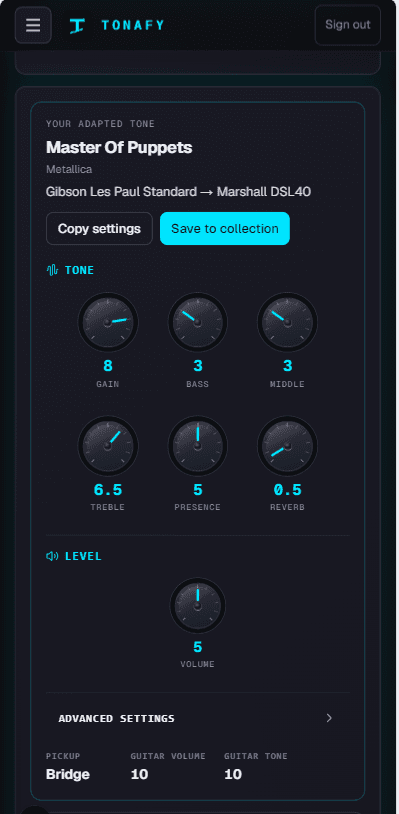
Master of Puppets
Gibson Les Paul Standard → Marshall DSL40
See Tonafy in action
Your song. Your gear. Your turn.
Get startedHow it works
Search any track and pick the part: riff, rhythm or solo.
Your guitar or bass, amp and pedals. Set it up once.
Amp knobs, pickup, guitar controls and effects, matched to your gear.
What you get
What the artist used on the record, so you know what you're chasing.
Every knob on your amp, plus pickup, volume and tone for your guitar.
What's on the record, what your pedals cover, and what's missing.
Line up your songs in gig order, then swipe through each tone on stage.
Create an account, set up your rig once, and generate adapted settings for any song.
Works with hundreds of guitars, basses, and amps
From bedroom practice amps to stage rigs, settings adapt to your exact gear catalog entry.
Choose a song, select your guitar or bass and amp, then generate. Tonafy returns amp settings for songs tailored to your rig: amp knobs, pickup choice, guitar controls, and effects notes.
Tonafy has paid plans for guitar and bass players. Pick the plan that fits how much you play and cancel anytime.
Settings are research-backed and adapted for guitar tone matching to your gear. They are a strong starting point. Rooms and speakers differ, so trust your ears and tweak from there.
A tone finder helps you recreate guitar tones from recordings. Tonafy goes further by adapting those settings to the amp and pedals you actually own.
Yes. Save your tones, put them in gig order, and use stage mode to swipe through each song's amp settings on stage.
Join Tonafy and get your first adapted tone in under a minute.